
AI Form Reading Assistant
Note
This was developed as a proof of concept and shown to the executives at the pathology lab where I worked. It's something they are very keen on, but will take years of bureaucracy before it can be deployed. That's normal and good - an assistant like this needs correct controls and oversight, especially in healthcare.
During my time at a pathology lab, one of my tasks was data entry - typing in data from paper forms. But when you examine the forms, many of them have computer printed text. So we're just entering what a computer already printed out, but often making mistakes along the way.
Turns out modern AI models are quite good at reading both the text, and also working out the layout of the forms with minimal instructions. This mattered because there were many variations of the forms, even from the same source.
So - as a thought exercise, I set out to find out if it modern AI tools could actually read these forms.
Turns out, they can...
Interactive proof of concept
Inspect what the assistant read
Tap a marker on the form to compare the extracted value with the source snippet.
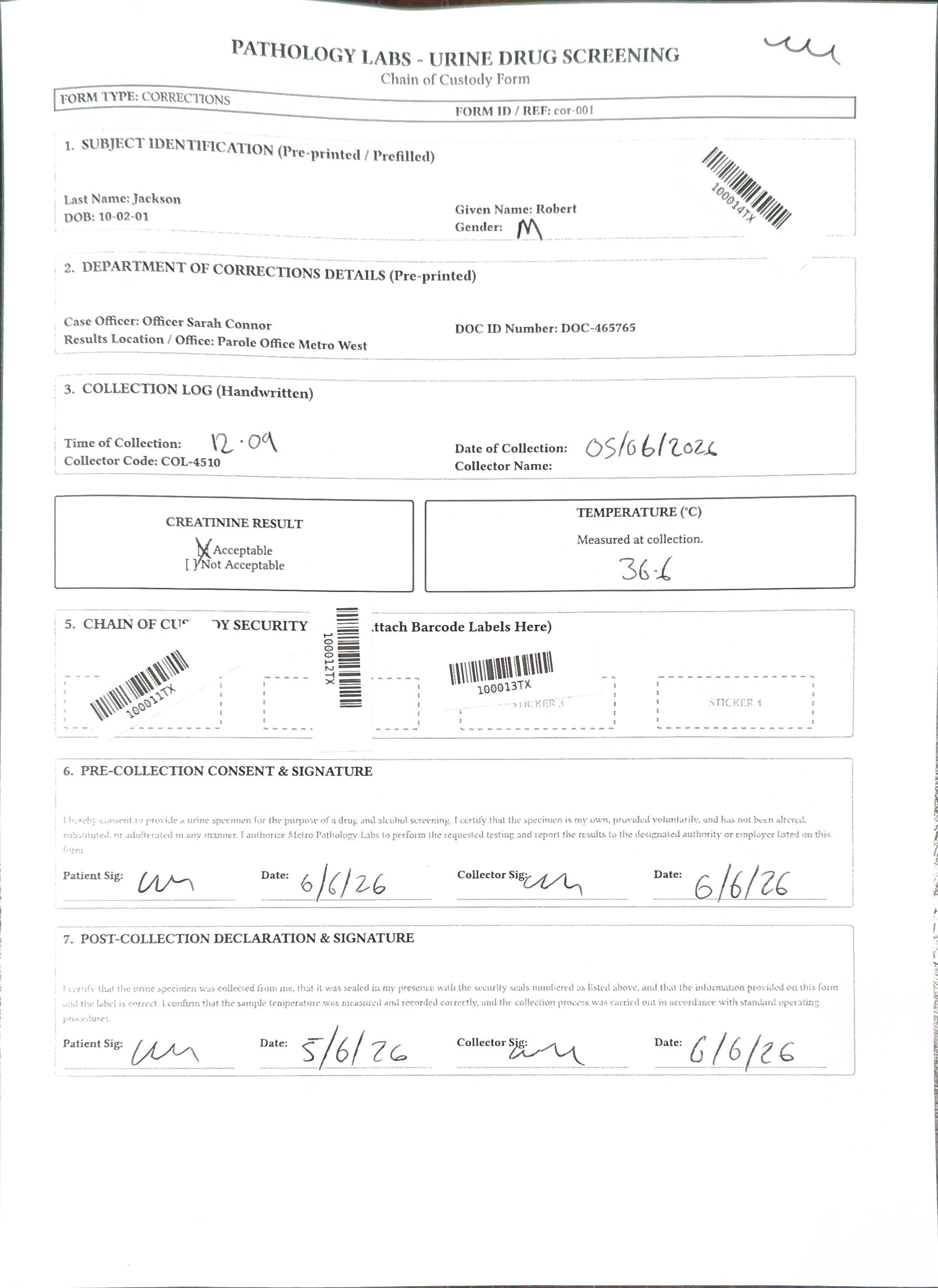
Matched result Needs human review Seal barcode
Tap a numbered field above to see what the assistant extracted, what the test data expected, and the cropped source it would give a human reviewer. I developed my own forms with different layouts and different labels for each field (for example, one form had "Given Name" and another had "First Name"). The AI was able to understand this and correctly extract the relevant data.
They also did a rather good job on the handwritten text too - not perfect, but that's to be expected - but good enough for a human to correct it afterwards.
But we need oversight
But we need oversight. We can't blindly trust what the AI says. So we crop out that part of the form, show it to the user, and then have them confirm that it's correct.
Integration
The Pathology lab uses a Windows based computer program to handle their workflow. The AI assistant can directly integrate with the windows app - acting like a user sitting in front of it. I did not test it against the real application, but did write a dummy application to prove the concept worked and how it might look.
Why did I choose to do this? Because it can work with what they already have, quickly and easily. It uses the existing data validation, and is easy for staff to understand and validate.
Privacy
As this was for a Pathology lab, we were dealing with sensitive health and patient data. So how can we handle this safely?
Some research showed that you actually didn't need large models to do this. Gemma 4 31B actually did a great job on these forms. And it's small enough that you can run it on a local computer (with the right hardware!), or in a secure cloud environment such as Azure.
This means it's actually possible to deploy this solution without sending any sensitive data to external AI providers.
For non-health care settings, when privacy isn't as critical, you can use cloud hosted systems. However, you still need to be aware of the potential for data leakage and ensure your chosen provider has robust security practices.
Cost
It's all about the cost. Using cloud frontier models, it worked out to be about 10c per page to process. Using cloud hosted machines is anywhere from $1 to $5 per hour - and you can turn these on and off as you need them, so you're not paying for anything you don't use. That $1-$5 per hour can crunch through about 500 pages, making the cost about 20c per page - but for privacy, that's essential.
Compare that to the cost of someone typing in the data, and possibly getting it wrong - we are human after all. This is a great use of AI; it's not a creative task, and it's frustrating for staff to do this repetitive work.
Speed
Turns out that AI models are incredibly flexible, and there are a bunch of settings you can tune to speed things up. Adjusting the context window and limiting the output tokens gave giant leaps in performance. This is the kind of rabbit hole that I love going down - to really understand the underlying technology and what can be accomplished with it. (If you must know, I ended up with an 8k context window which seems tiny, but is more than enough for processing forms promptly.)
Result
While the Pathology lab isn't ready to deploy this solution just yet - I surprised myself with how well it worked and how quickly it could process forms.
What paper processes could you clean up with this process?